Ornate Frame Corner Vector Design: A Practical Guide for Crafters and Designers
In the realm of digital design and physical crafting, the choice of decorative elements often defines the final aesthetic of a project. Among the most versatile assets available to creators is the Ornate Frame Corner Vector Design. These intricate silhouettes serve as foundational building blocks for invitations, certificates, menus, and home decor. Unlike raster images that degrade upon scaling, vector-based corner designs maintain crisp edges at any size, making them indispensable for professionals and DIY enthusiasts alike. This guide explores the specific utility of these designs, compares them with alternative decorative approaches, and outlines the scenarios where they offer the greatest value.
Defining the Ornate Frame Corner Vector Design
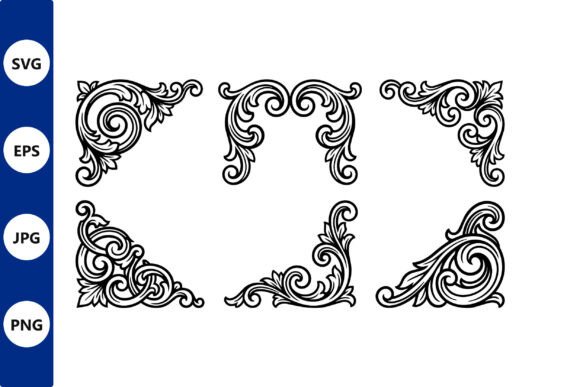
An Ornate Frame Corner Vector Design refers to a digital file containing highly detailed, decorative motifs intended for the four corners of a layout or object. Typically rendered in a black silhouette style, these designs rely on complex curves, flourishes, and scrollwork to evoke a sense of elegance and tradition. The "vector" aspect is critical; it means the image is constructed from mathematical paths rather than pixels. This distinction allows the design to be scaled from a small business card corner to a massive wall art piece without any loss of resolution.
What makes this specific category distinct is its modularity. Rather than providing a full border, which can sometimes overwhelm a central text or image, corner designs offer a subtle frame effect. They suggest completeness and structure while leaving the center open. In a premium set, these files are meticulously cleaned up, ensuring that nodes are optimized and stray points are removed. This preparation is essential for workflows involving laser cutting, Cricut machines, or CNC routers, where inefficient code can lead to machine errors or poor cut quality.
Comparing Vector Corners to Alternative Decorative Styles
When evaluating resources for a project, it is necessary to compare the Ornate Frame Corner Vector Design against other common decorative options. Each approach has inherent strengths and tradeoffs regarding flexibility, production method, and visual impact.
Full Borders vs. Corner Accents
A traditional full border encloses content completely. While effective for formal documents like diplomas, full borders can create visual clutter if the central content is dense. In contrast, an ornate corner design provides a "breathing room" effect. It frames the content psychologically without physically boxing it in. For modern invitations or minimalist menus, the corner-only approach often strikes a better balance between sophistication and readability.
Raster Images vs. Vector Files
The primary competitor to vector designs is the raster image (such as JPEG or PNG). Raster files are excellent for photographic textures but fail when precision is required. If you attempt to scale a raster corner design for a large wooden wall panel, the result will be pixelated and jagged. Conversely, the Ornate Frame Corner Vector Design remains sharp regardless of scale. Furthermore, raster files cannot be easily manipulated by cutting machines. You cannot feed a JPEG directly into a Cricut or laser cutter to produce a physical cutout; the software requires vector paths to understand where to cut.
Solid Frames vs. Silhouette Sets
Solid frames are continuous lines that connect corners. While they offer structural integrity in physical applications, they require more material and time to cut. A silhouette set consisting of individual corners allows for more creative placement. You might use only two corners for an asymmetrical look or space them further apart for a contemporary twist. This modularity offers a level of customization that pre-assembled solid frames do not provide.
Technical Formats and Workflow Compatibility
The utility of an Ornate Frame Corner Vector Design is heavily dependent on the file formats provided. A comprehensive set typically includes SVG, EPS, PNG, and JPG. Understanding the role of each format helps in selecting the right tool for the job.
- SVG (Scalable Vector Graphics): This is the industry standard for web design and vinyl cutting machines like Cricut and Silhouette. SVGs are lightweight and retain all path data, making them ideal for drag-and-drop workflows in browser-based design tools.
- EPS (Encapsulated PostScript): Often preferred by professional graphic designers using Adobe Illustrator or CorelDRAW. EPS files are robust and support high-end color management, making them suitable for print-ready commercial projects.
- PNG and JPG: While not editable as vectors, these raster versions are useful for quick mockups, digital presentations, or printing on materials where cutting is not required. They allow designers to visualize how the ornate details sit against a background before committing to a physical cut.
The inclusion of multiple formats ensures that the asset is future-proof. Whether you are designing a custom tattoo stencil or preparing a file for a CNC router, having the appropriate vector format eliminates the need for third-party tracing software, which can introduce errors and distort the delicate details of the ornamentation.
Strengths and Tradeoffs in Physical Crafting
For those engaging in DIY wooden wall art, metal decor, or decal creation, the Ornate Frame Corner Vector Design presents specific advantages and challenges.
Strengths in Material Processing
The meticulous cleanup of these vector files is their greatest asset in physical crafting. Laser cutters and CNC machines follow the mathematical paths defined in the file. If a design contains overlapping lines or unnecessary anchor points, the machine may struggle, leading to burnt wood, uneven cuts, or wasted material. Premium sets address this by optimizing the geometry. This efficiency translates to faster production times and higher success rates, particularly when working with expensive materials like brass or hardwood.
Tradeoffs in Complexity
However, the very detail that makes these designs beautiful can be a limitation. Extremely fine filigree may not translate well to certain materials. For instance, very thin lines in a delicate corner design might break during the weeding process of vinyl decals or snap off when cutting thin acrylic. Additionally, on porous materials like unfinished wood, deep laser engraving of tight curls can sometimes appear muddy rather than crisp. Creators must evaluate the scale of the project relative to the intricacy of the design. Sometimes, a slightly simplified version of the motif is more practical for smaller applications.
Decision Factors: When to Choose Ornate Corners
Selecting an Ornate Frame Corner Vector Design should be a deliberate decision based on the project's goals. Here are the scenarios where this resource is the optimal choice:
- High-End Print Materials: For wedding invitations, certificates of achievement, or restaurant menus, the classic elegance of ornate corners adds immediate perceived value. It signals attention to detail and tradition.
- Modular Wall Art: When creating DIY decor, individual corners allow for flexible arrangements. You can mount them around a mirror, a picture frame, or even as standalone geometric accents on a wall.
- Cutting and Engraving Projects: If your workflow involves a Cricut, laser cutter, or CNC machine, the vector nature of these files is non-negotiable. They ensure clean cuts and precise engraving.
- Commercial Branding: For businesses looking to add a touch of luxury to packaging or labels, these scalable designs can be adapted to fit various product sizes without losing quality.
Conversely, there are situations where this option may not be the best fit. If a project requires a bold, modern, or industrial aesthetic, the traditional scrollwork of an ornate design might feel out of place. Similarly, if the production timeline is extremely tight and the creator lacks experience with vector software, a pre-made template or a simpler geometric shape might be more efficient. Finally, if the application is purely digital and does not require scalability, a high-resolution raster image could suffice, though it would lack the editing flexibility of a vector.
Conclusion: Balancing Aesthetics and Functionality
The Ornate Frame Corner Vector Design occupies a unique space in the toolkit of modern creators. It bridges the gap between historical design traditions and modern digital manufacturing capabilities. By offering a modular, scalable, and technically optimized solution, it empowers users to elevate simple projects into polished, professional works. However, its effectiveness relies on understanding the limitations of the medium and the specific requirements of the end product. Whether used for a delicate tattoo stencil or a substantial wooden sign, the key lies in matching the complexity of the design with the capabilities of the chosen material and tool. For those willing to navigate these nuances, the result is a refined aesthetic that stands the test of time.